
Introduction
In this lesson, we will dive into arrays in Java, exploring their definition, purpose, declaration methods, and how they can be accessed and manipulated. You'll learn how to iterate through arrays effectively using loops, as well as grasp the concept of multi-dimensional arrays and their applications in Java programming. By the end of this lesson, you will have a solid understanding of arrays and will be able to incorporate them into your Java applications seamlessly.
What are Arrays?
In Java, an array is a data structure that allows you to store multiple values of the same type in a single variable. Arrays are particularly useful when you want to manage a collection of similar items, such as a list of student names or a series of temperature readings. Array utilities come from the java.util.Arrays class. Each element in an array can be accessed via its index, providing an efficient way to manage and manipulate large datasets.
Declaring and Initializing Arrays
To use arrays, you must first declare and initialize them. Here’s how you can do it:
Example 1: Declaring and Initializing an Array
/* Declare and initialize an array of integers */
int[] numbers = {1, 2, 3, 4, 5};
In the above example, we declare an integer array called numbers and initialize it with five values.
You can also declare an array first and then initialize it:
Example 2: Initializing an Array Separately
/* Declare an array of strings */
String[] fruits;
/* Initialize the array */
fruits = new String[3];
/* Assign values to the array */
fruits[0] = "Apple";
fruits[1] = "Banana";
fruits[2] = "Cherry";
In this example, fruits is declared first as an array capable of holding three strings, which are assigned afterwards.
Accessing and Manipulating Array Elements
Array elements can be accessed using their index. Array indexing in Java is zero-based, meaning the first element has an index of 0.
Example 3: Accessing Array Elements
/* Accessing elements from the numbers array */
System.out.println(numbers[0]); // Output: 1
System.out.println(numbers[4]); // Output: 5
This code retrieves the first and the last elements from the numbers array.
You can also modify an array element:
Example 4: Modifying Array Elements
/* Modify element at index 3 */
numbers[3] = 10;
System.out.println(numbers[3]); // Output: 10
Iterating Through Arrays
One of the most common tasks is iterating through arrays to access each element. The for loop is commonly used to accomplish this. To get the length of an array in Java, use the built-in length property (not a method).
Example 5: Iterating with a For Loop
/* Using a for loop to iterate through numbers array */
for (int i = 0; i < numbers.length; i++) {
    System.out.println(numbers[i]);
}
Output:
1
2
3
4
5
You can also use an enhanced for loop for simpler iteration:
Example 6: Enhanced For Loop
/* Enhanced for loop to iterate */
for (int num : numbers) {
    System.out.println(num);
}
Complete Example:
import java.util.Arrays;
public class ArraysExample {

    public static void main(String[] args) {

        /* Declare and initialize an array of integers */
        int[] numbers = {1, 2, 3, 4, 5};

        /* Accessing elements from the numbers array */
        System.out.println(numbers[0]);
        System.out.println(numbers[4]);

        /* Modify element at index 3 */
        numbers[3] = 10;
        System.out.println(numbers[3]);

        /* Declare and initialize an array of strings */
        String[] fruits = new String[3];

        /* Assign values to the array */
        fruits[0] = "Apple";
        fruits[1] = "Banana";
        fruits[2] = "Cherry";

        /* Using a for loop to iterate through numbers array */
        for (int i = 0; i < numbers.length; i++) {
            System.out.println("Number: " + numbers[i]);
        }

        /* Using for-each loop to iterate fruits array */
        for (String fruit : fruits) {
            System.out.println("Fruit: " + fruit);
        }
    }
}
Output:
1
5
10
Number: 1
Number: 2
Number: 3
Number: 10
Number: 5
Fruit: Apple
Fruit: Banana
Fruit: Cherry
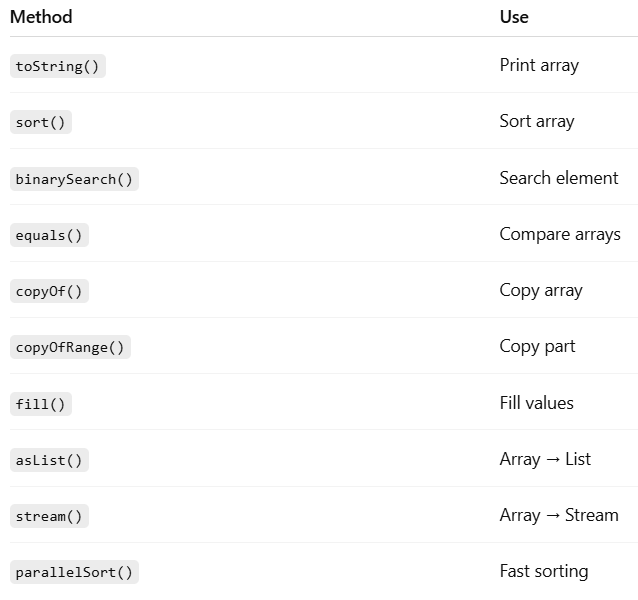
Array methods:
Summary / Key Takeaways
In this lesson on Understanding Arrays and Their Use, you have learned:
- Definition of Arrays: Arrays allow storing multiple values of the same type in a single variable.
- Declaration and Initialization: Different methods to declare and initialize arrays effectively.
- Accessing Elements: How to access and manipulate elements in an array using indices.
- Iterating Through Arrays: Using for loops and enhanced for loops to traverse array elements efficiently.
- Multi-Dimensional Arrays: Understanding arrays of arrays, particularly useful for representing matrices.