
Introduction
In this lesson, we will delve into the fundamental concept of loops in Java: for, while, and do-while loops. Loops are essential for repetitive tasks, allowing you to execute a block of code multiple times based on certain conditions. We will explore the syntax and usage of each loop type, compare their differences, and apply them to solve practical programming problems.
For Loops in Java
For loops are commonly used when the number of iterations is known beforehand. The syntax of a for loop is structured as follows:
for (initialization; condition; increment/decrement) {
    // Code to be executed
}
Example 1: Using a For Loop
Let’s take a look at a simple program that uses a for loop to print numbers from 1 to 5:
public class ForLoopExample {
    public static void main(String[] args) {
        for (int i = 1; i <= 5; i++) {
            System.out.println(i);
        }
    }
}
Explanation of the Program:
- We declared a class called
ForLoopExample. - Inside the
mainmethod, a for loop is initiated which startsiat 1 and incrementsiby 1 on each iteration untiliis greater than 5.
Output:
1
2
3
4
5
While Loops in Java
The while loop is used when the number of iterations is not predetermined and continues until a specific condition evaluates to false. Its syntax is as follows:
while (condition) {
    // Code to be executed
}
Example 2: Using a While Loop
Below is an example of a while loop that achieves the same task as our previous for loop:
public class WhileLoopExample {
    public static void main(String[] args) {
        int i = 1;
        while (i <= 5) {
            System.out.println(i);
            i++;
        }
    }
}
Explanation of the Program:
- This time, we initialize
ioutside of the loop and check the condition at the beginning of each iteration. - After printing
i, we increment it manually.
Output:
1
2
3
4
5
Do-While Loops in Java
A do-while loop is similar to a while loop, but it guarantees that the block of code will execute at least once, even if the condition is false from the start. The syntax is:
do {
    // Code to be executed
} while (condition);
Example 3: Using a Do-While Loop
Here’s an example using a do-while loop:
public class DoWhileLoopExample {
    public static void main(String[] args) {
        int i = 1;
        do {
            System.out.println(i);
            i++;
        } while (i <= 5);
    }
}
Explanation of the Program:
- The loop will execute at least once due to the
doblock. - It prints
iand increments it until the condition fails.
Output:
1
2
3
4
5
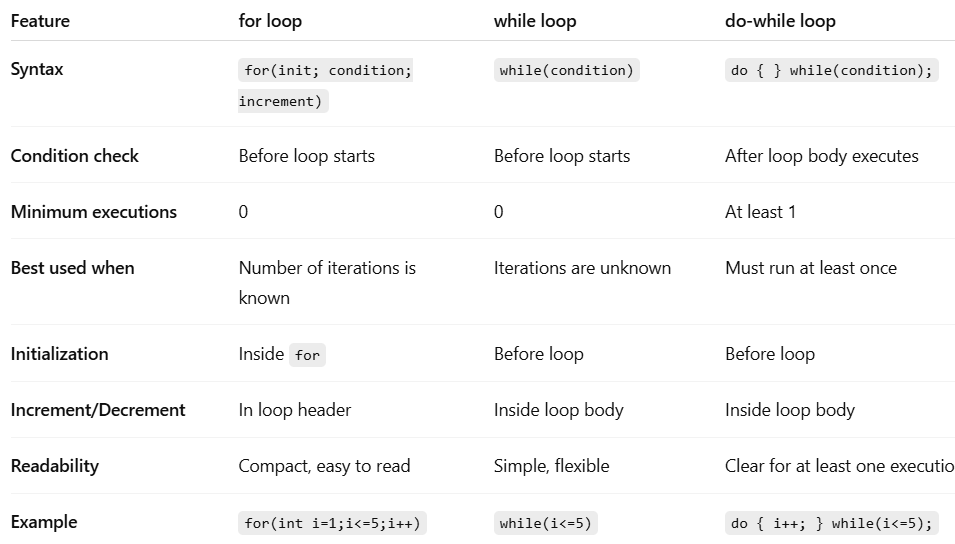
Differentiating Between For, While, and Do-While Loops
Practical Problem Solving with Loops
Loops can be applied to various scenarios. For example, let’s create a program that calculates the factorial of a number using a for loop:
Example 4: Factorial Calculation with For Loop
public class FactorialExample {
    public static void main(String[] args) {
        int num = 5;
        int factorial = 1;
        for (int i = 1; i <= num; i++) {
            factorial *= i;
        }
        System.out.println("Factorial of " + num + " is: " + factorial);
    }
}
Explanation of the Program:
- We declare
numas the number we want the factorial of and initializefactorialto 1. - The for loop multiplies
factorialbyifor values from 1 tonum.
Output:
Factorial of 5 is: 120
Summary / Key Takeaways
In this lesson on Loops in Java: For, While, Do-While, you have learned:
- For loops are used for iterations with a known range.
- While loops perform iterations based on a condition checked at the start.
- Do-while loops ensure at least one execution of the loop body, regardless of the condition.
- Understand the differences in behavior and use cases among the three loops.
- Practical application of loops can solve real-world programming problems like factorial calculation.
By mastering loops, you will enhance your capabilities to write efficient and effective Java programs.