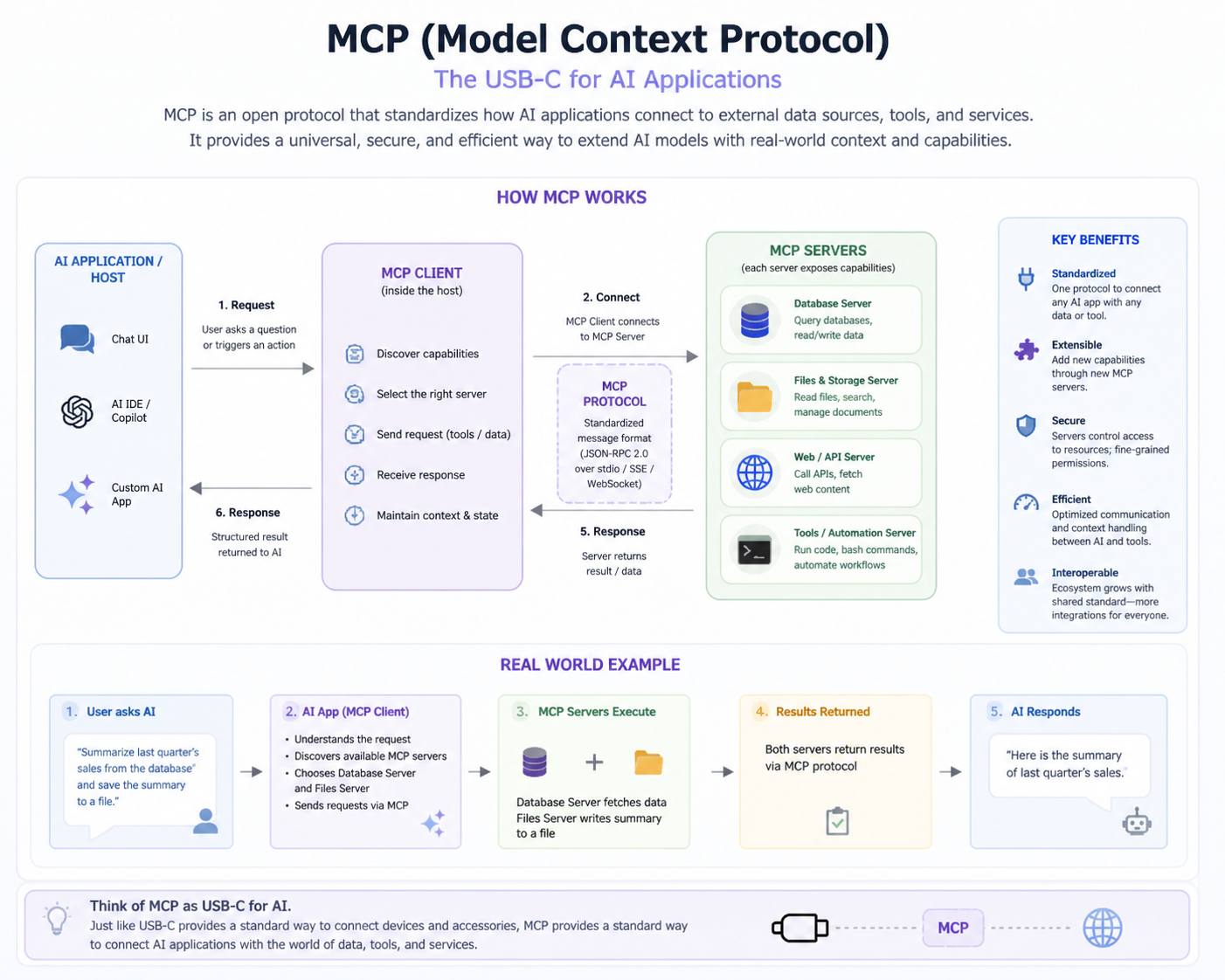
Explain the MCP architecture in detail.
MCP architecture consists of the Host, Client, and Server. The Host runs the AI model, the Client manages requests and responses, and the Server exposes tools, resources, and prompts. Communication is structured, ensuring consistent execution, validation, and context propagation between components.
In a coding assistant, VS Code acts as the Host, sending code analysis requests through the Client to a Server. The Server executes tools like 'lintCode' and returns results, enabling the AI model to provide accurate suggestions based on current project files.
How does tool calling work step by step?
Tool calling begins with the AI model identifying the need for an action, generating a structured request validated by a schema, sending it through the Client to the Server, which executes the tool and returns the results for the model to use in generating a response.
For example, when a user asks for current stock prices, the model calls a 'getStockPrice' tool. The Server queries a financial API and returns the result, allowing the model to respond accurately in real time.
How are tools defined in MCP?
Tools in MCP are defined with a name, description, input/output schemas, and optional execution logic. This structure ensures predictable interactions and safe execution while allowing the AI model to invoke the tool with validated parameters.
For example, a 'sendEmail' tool specifies 'recipient', 'subject', and 'body' fields. The AI model fills these fields, and the Server executes the action, preventing errors from missing or malformed inputs.
How do resources differ from APIs?
Resources provide read-only, structured data for AI models, while APIs may allow both read and write operations. MCP resources are directly integrated into the model’s context for safe, predictable access.
For instance, a 'projectFiles' resource lets an AI assistant read documentation or code without modifying it, whereas an API like 'updateDatabase' could perform changes requiring validation and security controls.
How are prompts used in MCP?
Prompts in MCP are templates guiding the AI model’s responses. They can include formatting instructions, context placeholders, and specific behavior directives, ensuring consistent, relevant outputs across different tools or user queries.
For example, a prompt for code explanations ensures the AI consistently provides comments on style, logic, and best practices, maintaining uniformity across multiple projects and queries.
How does MCP handle context sharing?
MCP shares context by maintaining information about previous interactions, session details, and relevant data across tools and requests. This ensures that AI responses are informed, coherent, and relevant to the ongoing task.
For example, if a user asks about a specific project, MCP passes the project identifier as context. Tools like 'getTaskStatus' use this context to return accurate results without asking the user to repeat information.
What is the role of JSON schema in tools?
JSON schemas define the structure, types, and constraints of tool inputs and outputs. They ensure that the AI model sends valid, well-formed data to tools, preventing execution errors and ensuring predictable results.
For example, a 'getWeather' tool requires 'location' as a string. The schema validates the input before execution, avoiding errors from missing fields or incorrect types.
How do you validate tool inputs?
Tool inputs are validated against JSON schemas, checking for required fields, data types, allowed values, and optional parameters. Validation ensures safe execution and prevents runtime errors or misuse of tools.
For example, a 'transferFunds' tool validates that 'amount' is numeric and positive before executing, preventing accidental or malicious invalid transactions.
What happens when validation fails?
If validation fails, the tool is not executed, and an error response is returned to the model. This prevents invalid or unsafe operations and allows the AI to handle the failure gracefully.
For instance, if a 'getWeather' request is missing the 'location' field, the Server rejects it. The model can then prompt the user to provide the missing information, avoiding incorrect results.
How do MCP clients discover tools?
Clients discover tools through server-provided metadata, including tool names, descriptions, and input/output schemas. This allows dynamic listing of available tools for models or user interfaces.
In an IDE, the AI assistant can show a menu of tools like 'lintCode' or 'runTests' based on discovery metadata provided by the MCP server.
How do you design a tool schema?
Designing a tool schema involves specifying the tool’s name, description, input/output fields, data types, validation rules, and optional default values. Clear schemas improve reliability, prevent errors, and facilitate integration with AI models.
For example, a 'createTask' tool might require 'title' and 'dueDate' fields with proper types and optional 'priority'. This ensures accurate task creation without misinterpretation by the model.
What are best practices for tool design?
Best practices include clear naming, descriptive documentation, complete schemas, validation for all inputs, default values for optional fields, and proper error handling. Tools should be modular, reusable, and secure to minimize execution risks.
For example, a 'sendNotification' tool should validate recipient addresses, have default messages for optional fields, and provide meaningful error responses to ensure smooth AI execution.
How do you integrate MCP with an IDE?
Integration involves embedding the MCP Client within the IDE, allowing the model to send requests to MCP Servers, receive results, and update the user interface. Tools, resources, and prompts must be accessible in the IDE context for seamless execution.
For example, in VS Code, the AI assistant uses MCP to fetch code suggestions, run linters, or retrieve documentation without leaving the IDE, creating a smooth user experience.
What is the role of the transport layer?
The transport layer defines how the Client and Server communicate. It ensures reliable, structured message delivery, supports synchronous or asynchronous calls, and handles serialization/deserialization of data for execution.
For example, HTTP transport allows remote MCP servers to serve multiple clients, while stdio transport is faster for local IDE integrations.
How does HTTP-based MCP communication work?
HTTP-based MCP communication involves the Client sending structured JSON requests to a remote Server endpoint. The Server executes the requested tool and returns a JSON response. This approach allows distributed, scalable AI applications with multiple clients accessing shared tools.
For example, a cloud-hosted AI assistant can request code analysis tools via HTTP, process the results, and return suggestions to the user in real time.
What are common errors in MCP systems?
Common errors include invalid inputs, missing fields, schema mismatches, network issues, tool execution failures, or timeout errors. Handling these errors gracefully ensures system reliability and robust AI behavior.
For example, a 'getWeather' tool request missing the 'location' field triggers a validation error. The AI model can inform the user instead of returning incorrect data.
How do you debug MCP tool failures?
Debugging involves reviewing logs, checking request/response payloads, verifying schema compliance, tracing tool execution, and validating context propagation. Proper observability aids in identifying issues efficiently.
For instance, if a 'sendEmail' tool fails, logs show input values, response codes, and execution flow, helping developers quickly identify missing parameters or network problems.
How do you log MCP interactions?
Logging includes recording tool requests, responses, errors, timestamps, and context details. Logs facilitate auditing, debugging, and monitoring system health.
For example, an AI assistant calling 'getStockPrice' logs the symbol, time, result, and any errors. This helps track usage patterns and diagnose issues if results are incorrect.
What is async execution in MCP?
Async execution allows tools to run in the background without blocking the model or client. This improves performance for long-running tasks and enables concurrent processing.
For example, a 'generateReport' tool may take several seconds. Async execution allows the model to continue handling other user requests while waiting for the report to complete.
When should you use async vs sync?
Use async for long-running, non-critical tasks to avoid blocking the system, and sync for short, quick operations where immediate results are needed.
For example, fetching a single user profile may use sync, while generating a multi-page report uses async to maintain responsiveness.
How do you handle long-running tools?
Long-running tools should use async execution, progress tracking, timeout handling, and possibly chunked responses. This prevents system stalls and maintains responsiveness.
For instance, a data analysis tool generating a large report returns intermediate updates, allowing the AI to inform the user of progress while continuing other operations.
What are caching strategies in MCP?
Caching stores frequently accessed results to reduce latency, improve performance, and minimize redundant computations. Both client-side and server-side caching can be used for tools and resources.
For example, weather data for a location can be cached for a few minutes. Repeated requests use cached results instead of querying the API every time.
How do you reduce latency?
Reduce latency by optimizing transport, using caching, minimizing data size, employing async execution, and deploying MCP servers closer to clients geographically.
For example, a cloud-based AI assistant can cache popular tool results and deploy edge servers near users, ensuring faster response times.
How do you handle multiple clients?
Handle multiple clients using concurrency, stateless server design, load balancing, and connection pooling. Each client should have isolated context to prevent interference.
For example, in a multi-user IDE, each developer’s AI assistant interacts with tools independently without affecting others, even when all requests go through the same server.
How do you structure an MCP server project?
Organize an MCP server with modular tools, clear resource definitions, reusable prompts, validation schemas, logging, and configuration files. Ensure separation of concerns and easy extensibility.
For instance, a code analysis server has separate modules for linting, formatting, and testing tools, each with defined schemas, making maintenance and scaling easier.
How do you test MCP tools?
Testing involves unit tests for tool logic, schema validation tests, integration tests with Client and Host, and end-to-end tests simulating real user requests.
For example, a 'sendEmail' tool is tested with valid and invalid recipient formats, checking responses, errors, and proper logging to ensure reliability.
What are common security risks?
Security risks include unauthorized access, injection attacks, malformed inputs, data leaks, and unsafe tool execution. Proper authentication, input validation, and sandboxing mitigate these risks.
For instance, validating email addresses in a 'sendEmail' tool prevents malicious commands, and user authentication ensures only authorized requests are executed.
How do you handle authentication?
Authentication ensures only authorized clients or users can access MCP servers. Methods include API keys, OAuth tokens, and session management to validate identity before tool execution.
For example, an AI assistant requires a valid token before accessing a 'getUserData' tool, preventing unauthorized access to sensitive information.
How do you handle authorization?
Authorization determines which actions a client or user can perform. MCP tools enforce permissions, ensuring only allowed operations are executed based on user roles or policies.
For example, a user may view task status but not modify it. The Server enforces this via authorization checks before executing relevant tools.
How do you version MCP tools?
Versioning involves labeling tools with version numbers, maintaining backward compatibility, and allowing clients to request specific versions. This ensures updates don’t break existing integrations.
For instance, 'generateReport v1' might produce PDF only, while 'v2' adds Excel output. Clients requesting v1 continue working without issues.