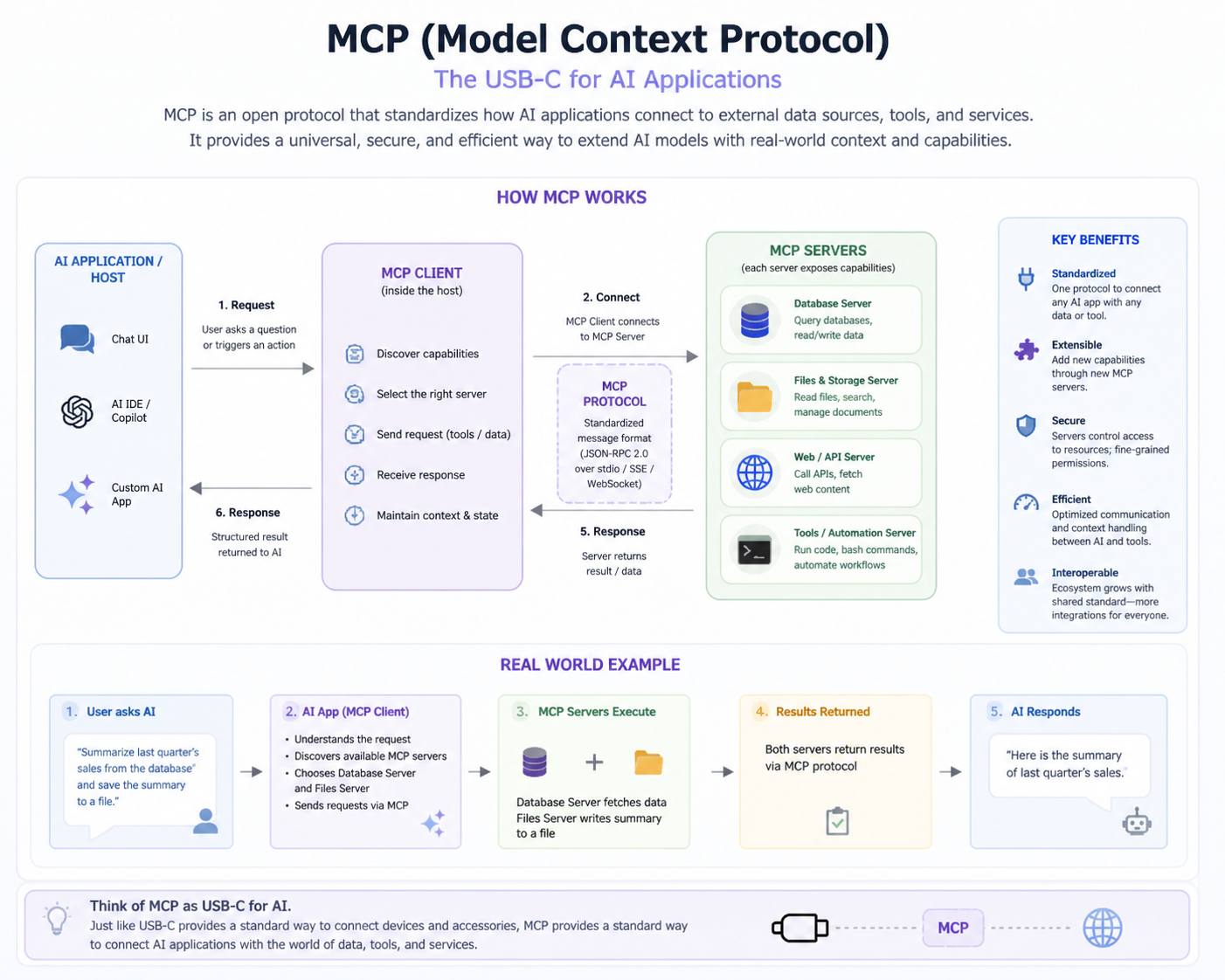
What is MCP (Model Context Protocol)?
MCP (Model Context Protocol) is a standardized protocol that enables AI models to interact with external systems, tools, and resources in a structured way. It allows models to perform actions, access live data, and generate responses that reflect real-world context, bridging the gap between static knowledge and practical tasks.
For example, an AI coding assistant can access project files, fetch API documentation, or execute code snippets. MCP ensures the model can interact with these external tools in a consistent, reliable manner, making its outputs actionable and useful in real-world scenarios.
Why is MCP needed?
MCP is needed because AI models alone are limited to pre-trained knowledge and cannot execute external actions or access live data. MCP provides a structured interface that enables models to perform dynamic operations, interact with tools, and deliver practical, up-to-date results to end users.
For instance, a virtual assistant using MCP can check a calendar, fetch live weather updates, or query stock prices. Without MCP, the model could only provide general answers, which would not meet real-time user requirements or support actionable decision-making.
What problems does MCP solve?
MCP solves the limitations of AI models that cannot directly interact with the real world. It allows safe and validated communication between models and external tools, enabling dynamic execution of operations and access to live data, making AI applications more practical and effective.
In an e-commerce chatbot, MCP allows the model to query inventory, process orders, and generate invoices in real time. This capability ensures accurate responses and actionable guidance, which would be impossible if the model relied solely on pre-trained knowledge.
What are the main components of MCP?
The main components of MCP are the Host, Client, and Server. The Host runs the AI model in an application, the Client manages communication between the model and servers, and the Server provides tools, resources, and prompts that the model can use to perform tasks efficiently.
For example, in a coding IDE, the Host is VS Code, the Client handles requests to fetch files or run code, and the Server executes these operations. This separation ensures modularity, clarity of responsibility, and scalable system design.
What is an MCP Host?
The MCP Host is the environment or application in which the AI model operates. It integrates the MCP Client, allowing the model to send requests and receive responses from MCP servers. Essentially, the Host acts as the interface between the user and the AI-powered system.
In a real scenario, VS Code acts as a Host. The AI model inside VS Code can generate code suggestions or fetch relevant files, facilitated by the Host that communicates with MCP servers via the Client.
What is an MCP Client?
The MCP Client manages communication between the AI model and MCP Servers. It sends structured requests to the server, receives responses, and ensures that messages are validated, formatted correctly, and delivered efficiently to the model for further processing.
For example, when an AI assistant needs to fetch a user’s email, the Client sends a structured request to the MCP Server hosting the email tool, retrieves the data, and passes it back to the model to provide a response.
What is an MCP Server?
An MCP Server hosts tools, resources, and prompts that AI models can access. It executes requested operations, returns structured responses, and ensures secure, validated interaction between the AI model and external systems, providing a reliable backbone for real-time functionality.
For example, an MCP Server may provide a 'getWeather' tool. When a user asks for today’s weather, the server executes the request, queries an API, and returns the results to the model, enabling a dynamic, real-world response.
How do MCP components interact?
MCP components interact through structured communication: the model in the Host generates a request, the Client sends it to the Server, the Server executes the tool or fetches data, and the response is returned to the model via the Client for further processing.
For instance, in an AI-powered project management tool, the model may request task status. The Client sends this request to the Server, which queries the database and returns current status, allowing the AI to respond accurately to the user.
What is a tool in MCP?
A tool in MCP is an executable function or operation that the AI model can invoke. Tools perform actions, process data, or interact with external systems, allowing AI models to go beyond static answers and perform real-world tasks.
For example, a 'sendEmail' tool allows the AI assistant to draft and send an email using structured parameters. Without tools, the model could only suggest text but could not perform actions.
What is a resource in MCP?
A resource is a read-only data element or structured dataset that the AI model can access via MCP. Resources provide information but do not execute actions, ensuring the model has access to relevant data without modifying it.
For instance, a 'projectFiles' resource allows a coding assistant to read documentation or code snippets without altering them. This helps the model provide contextually accurate suggestions.
What is a prompt in MCP?
A prompt in MCP is a reusable template that guides the AI model’s behavior and output formatting. Prompts define how models should respond to inputs or structure outputs, ensuring consistency and relevance across tasks.
For example, a code review prompt ensures that the AI assistant comments on code style, logic, and best practices consistently, regardless of the project or user query.
What is the difference between tools and resources?
Tools are executable functions that perform actions, whereas resources are static data or information accessed in a read-only manner. Tools actively process or manipulate data, while resources provide context or reference information for the model.
For example, a 'runQuery' tool executes a database command, whereas a 'userProfile' resource provides the AI model with the current user’s information without altering it.
What is tool calling?
Tool calling is the process where the AI model invokes a tool via MCP to perform an action or fetch data. The model generates a structured request that the server executes, and the response is returned for the model to use.
For instance, in a customer service chatbot, a user requests their account balance. The model calls the 'getBalance' tool, the server retrieves the data, and the model responds accurately in real time.
What is the basic flow of tool execution?
The basic flow involves the model detecting the need for a tool, generating a structured request, sending it via the Client to the Server, executing the tool, and returning the response to the model for further use.
For example, a weather assistant requests current conditions. The model calls the 'getWeather' tool, the server queries a weather API, and the model delivers the accurate temperature to the user.
What is JSON schema?
JSON schema defines the structure, types, and validation rules of tool inputs and outputs. It ensures that data passed between the model and tools is formatted correctly and meets expected requirements for safe execution.
For example, a 'getWeather' tool requires a 'location' field as a string. JSON schema validates this input before execution, preventing errors from invalid or malformed data.
Why is validation important in MCP?
Validation ensures that tool inputs are correct, safe, and comply with defined schemas. This prevents runtime errors, protects external systems from invalid data, and ensures reliable tool execution for accurate AI responses.
For example, a banking assistant tool requires account numbers in a specific format. Schema validation ensures only correctly formatted numbers are processed, avoiding errors or security issues.
What is a required field?
A required field is an input parameter that must be provided for a tool to execute correctly. Missing required fields will trigger validation errors, preventing the tool from running with incomplete data.
For instance, the 'location' field is required in a weather tool. Without it, the tool cannot fetch data, so validation stops execution until the input is provided.
What is an optional field?
An optional field is an input parameter that may or may not be included. Tools can execute without it, often using a default value if the field is not provided.
For example, a weather tool may have 'units' (Celsius/Fahrenheit) as optional. If the user doesn’t specify it, the tool defaults to a pre-set unit for execution.
What is stdio transport?
stdio transport is a communication method using standard input/output streams. It is typically used for local, fast integrations, especially in IDEs or desktop environments where low latency is important.
For example, an AI coding assistant in VS Code communicates with the MCP server via stdio to execute code suggestions instantly without network delays.
What is HTTP transport?
HTTP transport uses network requests to communicate between the Client and Server. It allows remote or cloud-based MCP servers to process requests and return responses, supporting scalable and distributed applications.
For instance, a cloud-based AI service uses HTTP transport to call MCP servers hosted remotely, enabling multiple clients to interact simultaneously and execute tools across a network.
What is the difference between stdio and HTTP?
stdio is local and offers low-latency communication, while HTTP is network-based, suitable for distributed or remote servers. Each has advantages: stdio is fast and simple, HTTP enables scalability and multi-client access.
For example, a local IDE integration would use stdio for quick responses, whereas a web-based assistant would use HTTP to communicate with a centralized MCP server.
What is request-response flow?
Request-response flow is the process where a model sends a structured request via the Client to a Server, the Server executes the action or retrieves data, and the response is sent back to the model.
For instance, when a chatbot needs order status, the model requests it through MCP. The server queries the database and returns the order information, which the model then communicates to the user.
What is an API?
An API (Application Programming Interface) is a set of rules and protocols that allows systems to interact with each other. MCP often wraps APIs as tools for AI models, enabling them to perform operations on external systems safely.
For example, a 'getWeather' API can be exposed as an MCP tool. The AI model calls it to get live weather data, transforming a standard API into a usable tool for the model.
How is MCP different from REST APIs?
MCP is designed for AI interaction, providing structured schemas, validation, and tool semantics, whereas REST APIs are general-purpose interfaces. MCP adds a layer of context management, tool execution flow, and integration specifically for model-driven tasks.
For example, a REST API delivers data, but MCP ensures that the AI model formats the request correctly, validates inputs, and interprets the response for actionable use.
What is structured data?
Structured data is information organized in a predefined format, such as JSON, that can be easily parsed, validated, and processed. MCP uses structured data to ensure predictable communication between models and tools.
For instance, when sending a 'getWeather' request, structured JSON ensures fields like 'location' and 'units' are correctly interpreted by the server.
What is the client-server model?
The client-server model is a system architecture where the client sends requests and the server processes them and returns responses. MCP follows this model to allow AI models (clients) to access tools and resources (servers) in a structured way.
For example, an AI assistant in an IDE acts as a client requesting code analysis from a server. The server executes the tool and returns results, enabling seamless interaction.
What is a simple use case of MCP?
A simple use case of MCP is fetching live data, like weather information, using a tool. The AI model sends a structured request via MCP, the server executes it, and the response is used to generate a relevant answer for the user.
For instance, a chatbot answering 'What is the weather today?' calls a 'getWeather' tool through MCP. The server queries a weather API and returns the temperature, allowing the model to provide accurate, real-time information.
What is context in MCP?
Context in MCP refers to information shared between the AI model and tools to ensure meaningful, accurate responses. Context can include previous interactions, user-specific data, or session information, helping models make informed decisions during tool execution.
For example, in a project management assistant, context could include which project the user is asking about. When calling a tool to fetch task status, the server uses context to return the correct data.
What is a schema-driven approach?
A schema-driven approach defines inputs, outputs, and validation rules for tools using structured schemas. It ensures consistency, reduces errors, and makes tool execution predictable when interacting with AI models.
For example, a 'getUserProfile' tool requires a 'userId' field. The schema validates that the input is present and correctly formatted, preventing errors and ensuring reliable data retrieval.