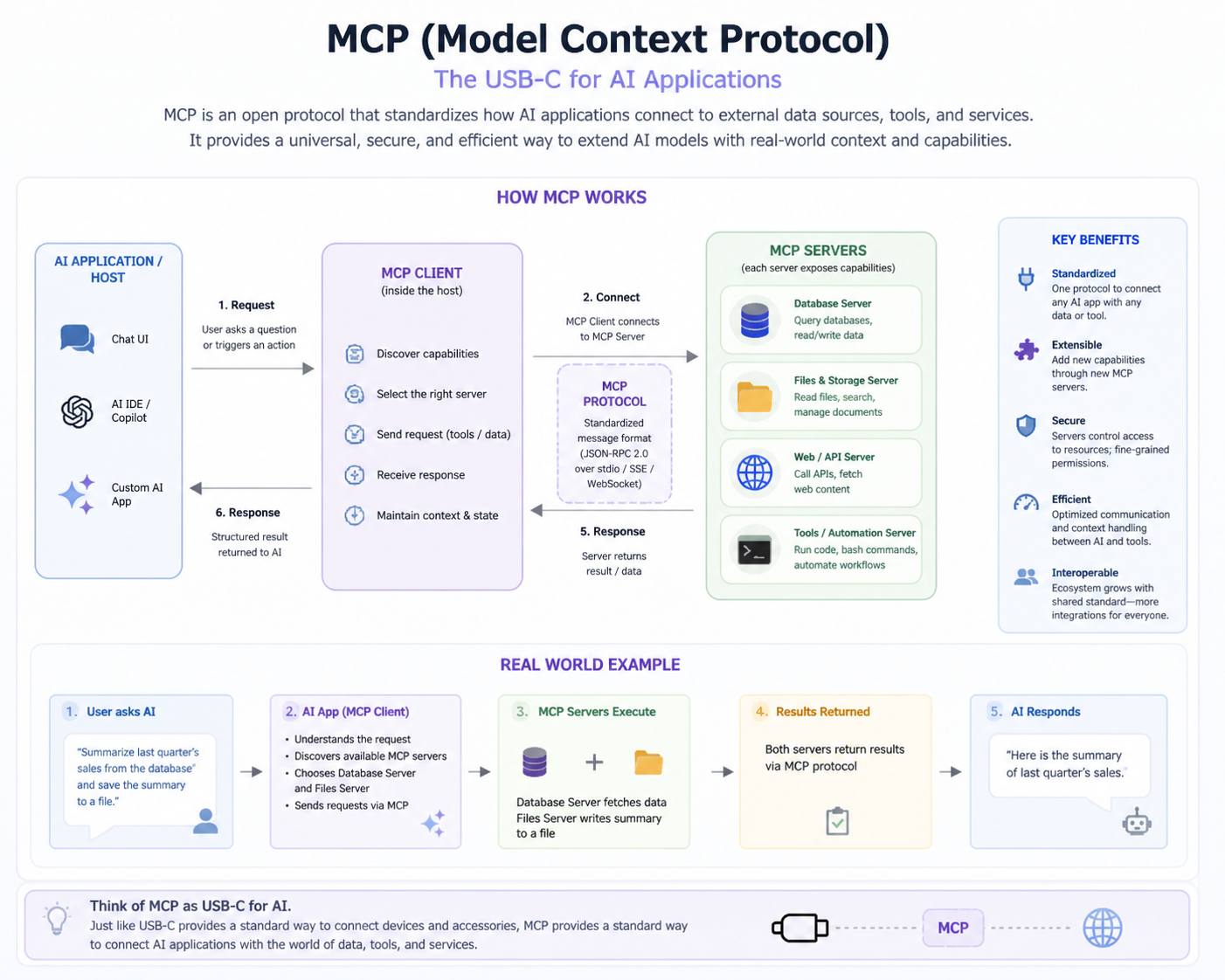
What is MCP (Model Context Protocol)?
MCP (Model Context Protocol) is a standardized protocol that enables AI models to interact with external systems, tools, and resources in a structured way. It allows models to perform actions, access live data, and generate responses that reflect real-world context, bridging the gap between static knowledge and practical tasks.
For example, an AI coding assistant can access project files, fetch API documentation, or execute code snippets. MCP ensures the model can interact with these external tools in a consistent, reliable manner, making its outputs actionable and useful in real-world scenarios.
Why is MCP needed?
MCP is needed because AI models alone are limited to pre-trained knowledge and cannot execute external actions or access live data. MCP provides a structured interface that enables models to perform dynamic operations, interact with tools, and deliver practical, up-to-date results to end users.
For instance, a virtual assistant using MCP can check a calendar, fetch live weather updates, or query stock prices. Without MCP, the model could only provide general answers, which would not meet real-time user requirements or support actionable decision-making.
What problems does MCP solve?
MCP solves the limitations of AI models that cannot directly interact with the real world. It allows safe and validated communication between models and external tools, enabling dynamic execution of operations and access to live data, making AI applications more practical and effective.
In an e-commerce chatbot, MCP allows the model to query inventory, process orders, and generate invoices in real time. This capability ensures accurate responses and actionable guidance, which would be impossible if the model relied solely on pre-trained knowledge.
What are the main components of MCP?
The main components of MCP are the Host, Client, and Server. The Host runs the AI model in an application, the Client manages communication between the model and servers, and the Server provides tools, resources, and prompts that the model can use to perform tasks efficiently.
For example, in a coding IDE, the Host is VS Code, the Client handles requests to fetch files or run code, and the Server executes these operations. This separation ensures modularity, clarity of responsibility, and scalable system design.
What is an MCP Host?
The MCP Host is the environment or application in which the AI model operates. It integrates the MCP Client, allowing the model to send requests and receive responses from MCP servers. Essentially, the Host acts as the interface between the user and the AI-powered system.
In a real scenario, VS Code acts as a Host. The AI model inside VS Code can generate code suggestions or fetch relevant files, facilitated by the Host that communicates with MCP servers via the Client.
What is an MCP Client?
The MCP Client manages communication between the AI model and MCP Servers. It sends structured requests to the server, receives responses, and ensures that messages are validated, formatted correctly, and delivered efficiently to the model for further processing.
For example, when an AI assistant needs to fetch a user’s email, the Client sends a structured request to the MCP Server hosting the email tool, retrieves the data, and passes it back to the model to provide a response.
What is an MCP Server?
An MCP Server hosts tools, resources, and prompts that AI models can access. It executes requested operations, returns structured responses, and ensures secure, validated interaction between the AI model and external systems, providing a reliable backbone for real-time functionality.
For example, an MCP Server may provide a 'getWeather' tool. When a user asks for today’s weather, the server executes the request, queries an API, and returns the results to the model, enabling a dynamic, real-world response.
How do MCP components interact?
MCP components interact through structured communication: the model in the Host generates a request, the Client sends it to the Server, the Server executes the tool or fetches data, and the response is returned to the model via the Client for further processing.
For instance, in an AI-powered project management tool, the model may request task status. The Client sends this request to the Server, which queries the database and returns current status, allowing the AI to respond accurately to the user.
What is a tool in MCP?
A tool in MCP is an executable function or operation that the AI model can invoke. Tools perform actions, process data, or interact with external systems, allowing AI models to go beyond static answers and perform real-world tasks.
For example, a 'sendEmail' tool allows the AI assistant to draft and send an email using structured parameters. Without tools, the model could only suggest text but could not perform actions.
What is a resource in MCP?
A resource is a read-only data element or structured dataset that the AI model can access via MCP. Resources provide information but do not execute actions, ensuring the model has access to relevant data without modifying it.
For instance, a 'projectFiles' resource allows a coding assistant to read documentation or code snippets without altering them. This helps the model provide contextually accurate suggestions.
What is a prompt in MCP?
A prompt in MCP is a reusable template that guides the AI model’s behavior and output formatting. Prompts define how models should respond to inputs or structure outputs, ensuring consistency and relevance across tasks.
For example, a code review prompt ensures that the AI assistant comments on code style, logic, and best practices consistently, regardless of the project or user query.
What is the difference between tools and resources?
Tools are executable functions that perform actions, whereas resources are static data or information accessed in a read-only manner. Tools actively process or manipulate data, while resources provide context or reference information for the model.
For example, a 'runQuery' tool executes a database command, whereas a 'userProfile' resource provides the AI model with the current user’s information without altering it.
What is tool calling?
Tool calling is the process where the AI model invokes a tool via MCP to perform an action or fetch data. The model generates a structured request that the server executes, and the response is returned for the model to use.
For instance, in a customer service chatbot, a user requests their account balance. The model calls the 'getBalance' tool, the server retrieves the data, and the model responds accurately in real time.
What is the basic flow of tool execution?
The basic flow involves the model detecting the need for a tool, generating a structured request, sending it via the Client to the Server, executing the tool, and returning the response to the model for further use.
For example, a weather assistant requests current conditions. The model calls the 'getWeather' tool, the server queries a weather API, and the model delivers the accurate temperature to the user.
What is JSON schema?
JSON schema defines the structure, types, and validation rules of tool inputs and outputs. It ensures that data passed between the model and tools is formatted correctly and meets expected requirements for safe execution.
For example, a 'getWeather' tool requires a 'location' field as a string. JSON schema validates this input before execution, preventing errors from invalid or malformed data.
Why is validation important in MCP?
Validation ensures that tool inputs are correct, safe, and comply with defined schemas. This prevents runtime errors, protects external systems from invalid data, and ensures reliable tool execution for accurate AI responses.
For example, a banking assistant tool requires account numbers in a specific format. Schema validation ensures only correctly formatted numbers are processed, avoiding errors or security issues.
What is a required field?
A required field is an input parameter that must be provided for a tool to execute correctly. Missing required fields will trigger validation errors, preventing the tool from running with incomplete data.
For instance, the 'location' field is required in a weather tool. Without it, the tool cannot fetch data, so validation stops execution until the input is provided.
What is an optional field?
An optional field is an input parameter that may or may not be included. Tools can execute without it, often using a default value if the field is not provided.
For example, a weather tool may have 'units' (Celsius/Fahrenheit) as optional. If the user doesn’t specify it, the tool defaults to a pre-set unit for execution.
What is stdio transport?
stdio transport is a communication method using standard input/output streams. It is typically used for local, fast integrations, especially in IDEs or desktop environments where low latency is important.
For example, an AI coding assistant in VS Code communicates with the MCP server via stdio to execute code suggestions instantly without network delays.
What is HTTP transport?
HTTP transport uses network requests to communicate between the Client and Server. It allows remote or cloud-based MCP servers to process requests and return responses, supporting scalable and distributed applications.
For instance, a cloud-based AI service uses HTTP transport to call MCP servers hosted remotely, enabling multiple clients to interact simultaneously and execute tools across a network.
What is the difference between stdio and HTTP?
stdio is local and offers low-latency communication, while HTTP is network-based, suitable for distributed or remote servers. Each has advantages: stdio is fast and simple, HTTP enables scalability and multi-client access.
For example, a local IDE integration would use stdio for quick responses, whereas a web-based assistant would use HTTP to communicate with a centralized MCP server.
What is request-response flow?
Request-response flow is the process where a model sends a structured request via the Client to a Server, the Server executes the action or retrieves data, and the response is sent back to the model.
For instance, when a chatbot needs order status, the model requests it through MCP. The server queries the database and returns the order information, which the model then communicates to the user.
What is an API?
An API (Application Programming Interface) is a set of rules and protocols that allows systems to interact with each other. MCP often wraps APIs as tools for AI models, enabling them to perform operations on external systems safely.
For example, a 'getWeather' API can be exposed as an MCP tool. The AI model calls it to get live weather data, transforming a standard API into a usable tool for the model.
How is MCP different from REST APIs?
MCP is designed for AI interaction, providing structured schemas, validation, and tool semantics, whereas REST APIs are general-purpose interfaces. MCP adds a layer of context management, tool execution flow, and integration specifically for model-driven tasks.
For example, a REST API delivers data, but MCP ensures that the AI model formats the request correctly, validates inputs, and interprets the response for actionable use.
What is structured data?
Structured data is information organized in a predefined format, such as JSON, that can be easily parsed, validated, and processed. MCP uses structured data to ensure predictable communication between models and tools.
For instance, when sending a 'getWeather' request, structured JSON ensures fields like 'location' and 'units' are correctly interpreted by the server.
What is the client-server model?
The client-server model is a system architecture where the client sends requests and the server processes them and returns responses. MCP follows this model to allow AI models (clients) to access tools and resources (servers) in a structured way.
For example, an AI assistant in an IDE acts as a client requesting code analysis from a server. The server executes the tool and returns results, enabling seamless interaction.
What is a simple use case of MCP?
A simple use case of MCP is fetching live data, like weather information, using a tool. The AI model sends a structured request via MCP, the server executes it, and the response is used to generate a relevant answer for the user.
For instance, a chatbot answering 'What is the weather today?' calls a 'getWeather' tool through MCP. The server queries a weather API and returns the temperature, allowing the model to provide accurate, real-time information.
What is context in MCP?
Context in MCP refers to information shared between the AI model and tools to ensure meaningful, accurate responses. Context can include previous interactions, user-specific data, or session information, helping models make informed decisions during tool execution.
For example, in a project management assistant, context could include which project the user is asking about. When calling a tool to fetch task status, the server uses context to return the correct data.
What is a schema-driven approach?
A schema-driven approach defines inputs, outputs, and validation rules for tools using structured schemas. It ensures consistency, reduces errors, and makes tool execution predictable when interacting with AI models.
For example, a 'getUserProfile' tool requires a 'userId' field. The schema validates that the input is present and correctly formatted, preventing errors and ensuring reliable data retrieval.
Explain the MCP architecture in detail.
MCP architecture consists of the Host, Client, and Server. The Host runs the AI model, the Client manages requests and responses, and the Server exposes tools, resources, and prompts. Communication is structured, ensuring consistent execution, validation, and context propagation between components.
In a coding assistant, VS Code acts as the Host, sending code analysis requests through the Client to a Server. The Server executes tools like 'lintCode' and returns results, enabling the AI model to provide accurate suggestions based on current project files.
How does tool calling work step by step?
Tool calling begins with the AI model identifying the need for an action, generating a structured request validated by a schema, sending it through the Client to the Server, which executes the tool and returns the results for the model to use in generating a response.
For example, when a user asks for current stock prices, the model calls a 'getStockPrice' tool. The Server queries a financial API and returns the result, allowing the model to respond accurately in real time.
How are tools defined in MCP?
Tools in MCP are defined with a name, description, input/output schemas, and optional execution logic. This structure ensures predictable interactions and safe execution while allowing the AI model to invoke the tool with validated parameters.
For example, a 'sendEmail' tool specifies 'recipient', 'subject', and 'body' fields. The AI model fills these fields, and the Server executes the action, preventing errors from missing or malformed inputs.
How do resources differ from APIs?
Resources provide read-only, structured data for AI models, while APIs may allow both read and write operations. MCP resources are directly integrated into the model’s context for safe, predictable access.
For instance, a 'projectFiles' resource lets an AI assistant read documentation or code without modifying it, whereas an API like 'updateDatabase' could perform changes requiring validation and security controls.
How are prompts used in MCP?
Prompts in MCP are templates guiding the AI model’s responses. They can include formatting instructions, context placeholders, and specific behavior directives, ensuring consistent, relevant outputs across different tools or user queries.
For example, a prompt for code explanations ensures the AI consistently provides comments on style, logic, and best practices, maintaining uniformity across multiple projects and queries.
How does MCP handle context sharing?
MCP shares context by maintaining information about previous interactions, session details, and relevant data across tools and requests. This ensures that AI responses are informed, coherent, and relevant to the ongoing task.
For example, if a user asks about a specific project, MCP passes the project identifier as context. Tools like 'getTaskStatus' use this context to return accurate results without asking the user to repeat information.
What is the role of JSON schema in tools?
JSON schemas define the structure, types, and constraints of tool inputs and outputs. They ensure that the AI model sends valid, well-formed data to tools, preventing execution errors and ensuring predictable results.
For example, a 'getWeather' tool requires 'location' as a string. The schema validates the input before execution, avoiding errors from missing fields or incorrect types.
How do you validate tool inputs?
Tool inputs are validated against JSON schemas, checking for required fields, data types, allowed values, and optional parameters. Validation ensures safe execution and prevents runtime errors or misuse of tools.
For example, a 'transferFunds' tool validates that 'amount' is numeric and positive before executing, preventing accidental or malicious invalid transactions.
What happens when validation fails?
If validation fails, the tool is not executed, and an error response is returned to the model. This prevents invalid or unsafe operations and allows the AI to handle the failure gracefully.
For instance, if a 'getWeather' request is missing the 'location' field, the Server rejects it. The model can then prompt the user to provide the missing information, avoiding incorrect results.
How do MCP clients discover tools?
Clients discover tools through server-provided metadata, including tool names, descriptions, and input/output schemas. This allows dynamic listing of available tools for models or user interfaces.
In an IDE, the AI assistant can show a menu of tools like 'lintCode' or 'runTests' based on discovery metadata provided by the MCP server.
How do you design a tool schema?
Designing a tool schema involves specifying the tool’s name, description, input/output fields, data types, validation rules, and optional default values. Clear schemas improve reliability, prevent errors, and facilitate integration with AI models.
For example, a 'createTask' tool might require 'title' and 'dueDate' fields with proper types and optional 'priority'. This ensures accurate task creation without misinterpretation by the model.
What are best practices for tool design?
Best practices include clear naming, descriptive documentation, complete schemas, validation for all inputs, default values for optional fields, and proper error handling. Tools should be modular, reusable, and secure to minimize execution risks.
For example, a 'sendNotification' tool should validate recipient addresses, have default messages for optional fields, and provide meaningful error responses to ensure smooth AI execution.
How do you integrate MCP with an IDE?
Integration involves embedding the MCP Client within the IDE, allowing the model to send requests to MCP Servers, receive results, and update the user interface. Tools, resources, and prompts must be accessible in the IDE context for seamless execution.
For example, in VS Code, the AI assistant uses MCP to fetch code suggestions, run linters, or retrieve documentation without leaving the IDE, creating a smooth user experience.
What is the role of the transport layer?
The transport layer defines how the Client and Server communicate. It ensures reliable, structured message delivery, supports synchronous or asynchronous calls, and handles serialization/deserialization of data for execution.
For example, HTTP transport allows remote MCP servers to serve multiple clients, while stdio transport is faster for local IDE integrations.
How does HTTP-based MCP communication work?
HTTP-based MCP communication involves the Client sending structured JSON requests to a remote Server endpoint. The Server executes the requested tool and returns a JSON response. This approach allows distributed, scalable AI applications with multiple clients accessing shared tools.
For example, a cloud-hosted AI assistant can request code analysis tools via HTTP, process the results, and return suggestions to the user in real time.
What are common errors in MCP systems?
Common errors include invalid inputs, missing fields, schema mismatches, network issues, tool execution failures, or timeout errors. Handling these errors gracefully ensures system reliability and robust AI behavior.
For example, a 'getWeather' tool request missing the 'location' field triggers a validation error. The AI model can inform the user instead of returning incorrect data.
How do you debug MCP tool failures?
Debugging involves reviewing logs, checking request/response payloads, verifying schema compliance, tracing tool execution, and validating context propagation. Proper observability aids in identifying issues efficiently.
For instance, if a 'sendEmail' tool fails, logs show input values, response codes, and execution flow, helping developers quickly identify missing parameters or network problems.
How do you log MCP interactions?
Logging includes recording tool requests, responses, errors, timestamps, and context details. Logs facilitate auditing, debugging, and monitoring system health.
For example, an AI assistant calling 'getStockPrice' logs the symbol, time, result, and any errors. This helps track usage patterns and diagnose issues if results are incorrect.
What is async execution in MCP?
Async execution allows tools to run in the background without blocking the model or client. This improves performance for long-running tasks and enables concurrent processing.
For example, a 'generateReport' tool may take several seconds. Async execution allows the model to continue handling other user requests while waiting for the report to complete.
When should you use async vs sync?
Use async for long-running, non-critical tasks to avoid blocking the system, and sync for short, quick operations where immediate results are needed.
For example, fetching a single user profile may use sync, while generating a multi-page report uses async to maintain responsiveness.
How do you handle long-running tools?
Long-running tools should use async execution, progress tracking, timeout handling, and possibly chunked responses. This prevents system stalls and maintains responsiveness.
For instance, a data analysis tool generating a large report returns intermediate updates, allowing the AI to inform the user of progress while continuing other operations.
What are caching strategies in MCP?
Caching stores frequently accessed results to reduce latency, improve performance, and minimize redundant computations. Both client-side and server-side caching can be used for tools and resources.
For example, weather data for a location can be cached for a few minutes. Repeated requests use cached results instead of querying the API every time.
How do you reduce latency?
Reduce latency by optimizing transport, using caching, minimizing data size, employing async execution, and deploying MCP servers closer to clients geographically.
For example, a cloud-based AI assistant can cache popular tool results and deploy edge servers near users, ensuring faster response times.
How do you handle multiple clients?
Handle multiple clients using concurrency, stateless server design, load balancing, and connection pooling. Each client should have isolated context to prevent interference.
For example, in a multi-user IDE, each developer’s AI assistant interacts with tools independently without affecting others, even when all requests go through the same server.
How do you structure an MCP server project?
Organize an MCP server with modular tools, clear resource definitions, reusable prompts, validation schemas, logging, and configuration files. Ensure separation of concerns and easy extensibility.
For instance, a code analysis server has separate modules for linting, formatting, and testing tools, each with defined schemas, making maintenance and scaling easier.
How do you test MCP tools?
Testing involves unit tests for tool logic, schema validation tests, integration tests with Client and Host, and end-to-end tests simulating real user requests.
For example, a 'sendEmail' tool is tested with valid and invalid recipient formats, checking responses, errors, and proper logging to ensure reliability.
What are common security risks?
Security risks include unauthorized access, injection attacks, malformed inputs, data leaks, and unsafe tool execution. Proper authentication, input validation, and sandboxing mitigate these risks.
For instance, validating email addresses in a 'sendEmail' tool prevents malicious commands, and user authentication ensures only authorized requests are executed.
How do you handle authentication?
Authentication ensures only authorized clients or users can access MCP servers. Methods include API keys, OAuth tokens, and session management to validate identity before tool execution.
For example, an AI assistant requires a valid token before accessing a 'getUserData' tool, preventing unauthorized access to sensitive information.
How do you handle authorization?
Authorization determines which actions a client or user can perform. MCP tools enforce permissions, ensuring only allowed operations are executed based on user roles or policies.
For example, a user may view task status but not modify it. The Server enforces this via authorization checks before executing relevant tools.
How do you version MCP tools?
Versioning involves labeling tools with version numbers, maintaining backward compatibility, and allowing clients to request specific versions. This ensures updates don’t break existing integrations.
For instance, 'generateReport v1' might produce PDF only, while 'v2' adds Excel output. Clients requesting v1 continue working without issues.
How do you design a scalable MCP system?
A scalable MCP system is designed to handle growing user requests efficiently. Key practices include stateless servers, horizontal scaling, load balancing, caching frequent results, asynchronous execution for long-running tasks, and proper monitoring to ensure high availability and responsiveness.
For example, a cloud-based AI platform serving thousands of developers deploys multiple MCP servers behind a load balancer. Each server can process requests independently, and caching ensures that repeated queries, like fetching project templates, are served quickly.
How do you implement fault tolerance in MCP?
Fault tolerance is implemented by having redundant servers, retries on failure, proper exception handling, health checks, and circuit breakers. This ensures the system remains available even when some components fail.
For example, if one MCP server fails while processing a tool request, the client can retry the request on another server, preventing downtime and ensuring users receive uninterrupted service.
How do you optimize MCP tool performance?
Tool performance can be optimized by minimizing data payloads, caching frequent results, using asynchronous execution, optimizing code logic, and placing servers close to clients geographically to reduce latency.
For instance, a tool fetching large datasets can use caching and batch processing to avoid repeated heavy computation, improving response times for the AI assistant.
How do you handle high concurrency in MCP?
High concurrency is handled through asynchronous processing, stateless servers, load balancing, connection pooling, and isolated session management. This ensures multiple clients can interact simultaneously without interfering with each other.
For example, multiple developers using an AI coding assistant at the same time can call 'runTests' tools concurrently without performance degradation or conflicts.
How do you implement monitoring for MCP?
Monitoring involves tracking metrics such as request latency, error rates, throughput, tool execution times, and resource utilization. Logs, dashboards, and alerting systems help identify and resolve issues proactively.
For example, if the 'getWeather' tool shows increasing latency, monitoring alerts the operations team to investigate potential bottlenecks in the server or network.
How do you manage context across multiple tools?
Context management involves maintaining session state, passing relevant data between tools, and using structured metadata to ensure coherent AI responses across multiple requests or tool interactions.
For instance, a user asks about project tasks, then requests a report. MCP passes project ID and relevant context to each tool, ensuring accurate, consistent results.
How do you implement secure tool execution?
Secure execution involves input validation, sandboxing, access control, authentication, encryption, and logging. This prevents malicious requests from compromising the system or exposing sensitive data.
For example, executing a 'deleteFile' tool only after verifying user permissions and sandboxing the operation ensures security and prevents accidental or malicious deletion.
How do you handle async responses in MCP?
Async responses are handled by returning a request ID immediately, allowing the client or model to poll or subscribe to updates. This prevents blocking and supports long-running operations.
For example, generating a multi-page report may take minutes. The model receives a request ID and can continue other tasks while periodically checking for completion.
How do you implement tool versioning?
Tool versioning involves assigning semantic version numbers, maintaining backward compatibility, and allowing clients to request specific versions. This ensures that updates do not break existing workflows.
For instance, 'generateReport v1' produces PDF only, while 'v2' adds Excel output. Clients requesting v1 continue working without disruption.
How do you handle tool dependencies?
Dependencies are managed by clearly defining required tools, libraries, or resources, ensuring they are installed or available, and using initialization scripts or containerization to guarantee consistent environments.
For example, a 'runTests' tool may depend on a code linter. Containers ensure the linter version is consistent across all servers.
How do you implement caching for MCP tools?
Caching involves storing results of frequently accessed tools or computations to reduce latency and load. Both server-side and client-side caches can be employed, with expiration strategies to maintain freshness.
For example, a 'getWeather' tool caches results for five minutes. Repeated requests within this period return cached data, improving speed and reducing API calls.
How do you handle rate limiting?
Rate limiting controls the number of requests a client can make over time, protecting servers from overload. Strategies include token buckets, fixed windows, and dynamic throttling.
For example, an AI platform restricts 'runTests' tool usage to 50 requests per minute per user to ensure fair usage and prevent system strain.
How do you implement load balancing?
Load balancing distributes requests across multiple servers using round-robin, least-connections, or weighted strategies. This ensures high availability, fault tolerance, and optimal resource utilization.
For example, multiple MCP servers handle code analysis requests. A load balancer ensures each server receives a fair share of requests, maintaining consistent performance.
How do you design MCP for multi-tenant environments?
Multi-tenant MCP systems isolate client data and sessions, enforce per-tenant permissions, and use scalable resources to ensure security, privacy, and performance across tenants.
For example, different companies using the same AI assistant can execute tools and store context independently without risk of cross-tenant data leakage.
How do you implement observability in MCP?
Observability includes logging requests, responses, errors, metrics, and traces. This helps understand system behavior, identify bottlenecks, and optimize performance in real time.
For example, tracking request latency for 'generateReport' tools helps identify slow queries or inefficient code, allowing teams to optimize execution.
How do you handle distributed MCP servers?
Distributed servers require consistent communication, synchronized context, fault tolerance, and load balancing. Each server should operate statelessly or maintain replicated state for resilience.
For instance, a cloud-hosted AI assistant with servers in multiple regions ensures that user requests are routed to the nearest server for low latency.
How do you secure communication between Client and Server?
Secure communication involves encryption (TLS/SSL), authentication tokens, signed requests, and input validation to prevent interception, tampering, or unauthorized access.
For example, a model calling a 'getUserData' tool sends a TLS-encrypted request with a valid API token, ensuring that sensitive data is protected in transit.
How do you manage sensitive data in MCP?
Sensitive data should be encrypted at rest and in transit, masked when unnecessary, and accessed only with proper authorization. Logging must avoid recording confidential information.
For example, an AI assistant querying bank account balances encrypts data and returns only relevant information to the model, ensuring user privacy and regulatory compliance.
How do you handle versioned APIs in MCP tools?
Versioned APIs allow clients to specify which tool version to use. Backward compatibility is maintained, and deprecation schedules are communicated to prevent disruptions.
For instance, a 'generateInvoice' API v1 outputs PDFs, while v2 adds Excel. Clients requesting v1 continue using the old format without breaking their workflows.
How do you implement retries and backoff?
Retries with exponential backoff handle transient failures, network glitches, or rate limiting. This ensures reliability without overwhelming servers with repeated immediate requests.
For example, if 'getWeather' fails due to a temporary API issue, the Client retries after increasing intervals, successfully retrieving data without overloading the server.
How do you monitor tool performance metrics?
Monitor execution time, success/failure rates, throughput, and resource consumption for each tool. Alerts can be triggered for anomalies, helping optimize performance and reliability.
For example, tracking latency spikes in 'runTests' tools allows engineers to identify inefficient code or server bottlenecks before affecting users.
How do you handle tool deprecation?
Deprecation involves notifying clients, providing alternative tools, and maintaining backward compatibility until a safe removal time. Clear documentation prevents system disruption.
For instance, a 'generatePDFReport' tool may be deprecated in favor of 'generatePDFExcelReport'. Clients are informed and transition gradually without breaking existing workflows.
How do you implement circuit breakers?
Circuit breakers detect repeated failures and temporarily block requests to problematic tools or servers, preventing cascading failures and maintaining system stability.
For example, if 'sendEmail' continuously fails, the circuit breaker stops new calls temporarily, allowing recovery and preventing overload while notifying developers.
How do you optimize network communication?
Optimize by compressing payloads, batching requests, minimizing data transfer, and placing servers closer to clients geographically. Use efficient serialization formats to reduce overhead.
For example, batching multiple 'getTaskStatus' requests into one reduces repeated network calls, improving response time and lowering server load.
How do you implement real-time streaming?
Real-time streaming allows tools to send incremental results to the client, reducing latency for large or long-running tasks. Techniques include WebSockets, SSE, or streaming HTTP responses.
For instance, a 'generateReport' tool streams pages as they are generated, enabling the AI model to display partial results while the rest is still processing.
How do you handle stateful operations in MCP?
Stateful operations maintain session-specific data across multiple requests. This requires storing context securely, isolating user sessions, and ensuring consistency even during server failures or restarts.
For example, in a multi-step workflow, a user fills forms step by step. MCP tracks the session context to ensure the next tool call continues from the previous state.
How do you perform load testing?
Load testing simulates high request volumes to measure latency, throughput, and error rates. Tools like JMeter or custom scripts test MCP server performance under realistic scenarios.
For example, simulating thousands of 'runTests' requests helps identify bottlenecks and informs scaling strategies before production deployment.
How do you handle multi-region deployments?
Multi-region deployments use replication, geo-routing, and consistent context sharing. They reduce latency, increase availability, and provide disaster recovery options.
For example, MCP servers in the US and Europe handle requests from nearby users, ensuring fast response times and high reliability even during regional outages.
How do you ensure high availability?
High availability is achieved through redundant servers, load balancing, automatic failover, monitoring, and fault-tolerant design. This minimizes downtime and ensures continuous access to MCP tools.
For instance, if one MCP server fails, requests are routed to another without interruption, maintaining consistent service for AI-assisted applications.
How do you implement observability for async tasks?
Observability includes logging request IDs, execution times, errors, and progress updates. Dashboards and alerts help track long-running or background tasks and detect anomalies early.
For example, a 'generateReport' tool running asynchronously reports progress every few seconds, allowing operators to monitor completion and quickly identify failures.