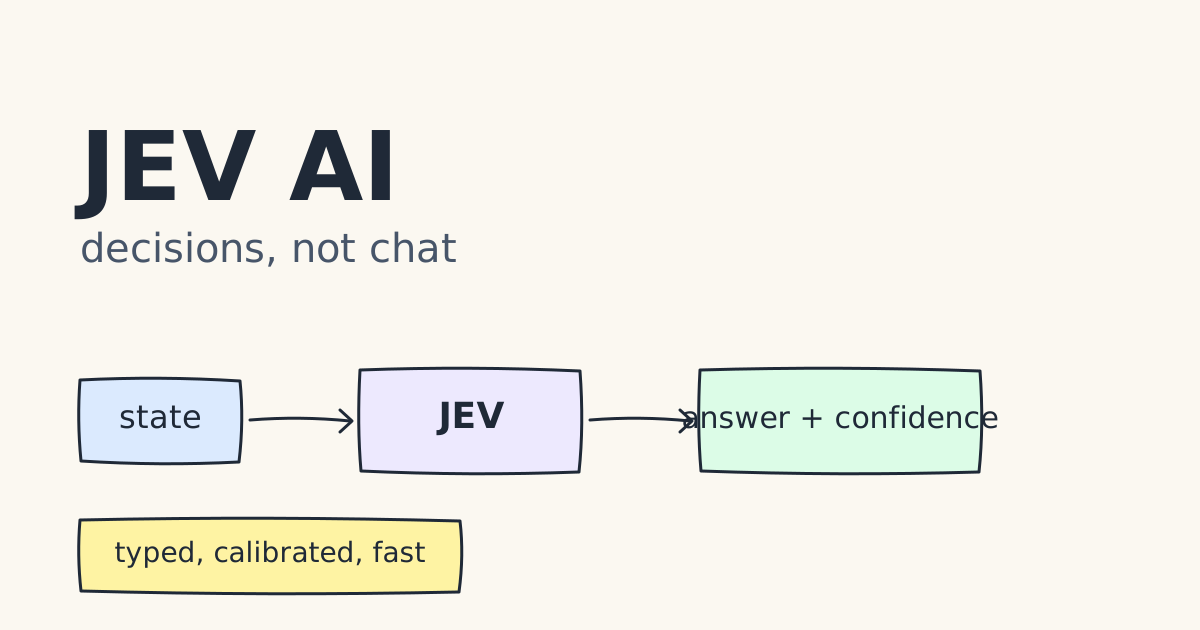
What is JEV AI?
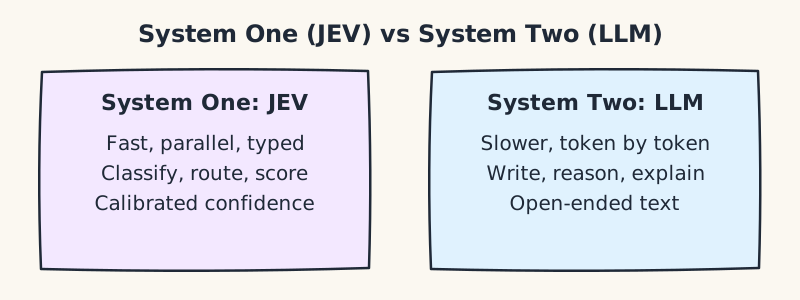
JEV is a model from TypeSafe AI, released in early access. TypeSafe calls it its first System One model. The name borrows from Daniel Kahneman's split between fast, intuitive thinking (System One) and slow, deliberate thinking (System Two). In this framing, LLMs are the slow, deliberate reasoners, and JEV is the fast layer that handles repetitive decisions.
TypeSafe describes JEV as "a frontier-intelligence function call: unstructured state in, typed probabilistic decisions out." You send it some state (text or a JSON object) and a list of questions. It returns answers in the shape you specified, each with a confidence value.
JEV is not built to write essays, hold a conversation, or explain its reasoning. It is built to answer questions such as:
- Which team should handle this ticket?
- Is this message urgent?
- How frustrated is this customer, on a 1 to 5 scale?
- Does this transaction need a human to look at it?
JEV is not the same as JEPA, a separate research architecture from Meta. JEPA AI explained covers that design.
Core concepts
System One vs. System Two
| | System One (JEV) | System Two (LLM) | | --------------- | ------------------------------- | ----------------------------------- | | Purpose | Fast, repeatable decisions | Open-ended reasoning and generation | | Output | Predefined, typed values | Free-form text | | Typical latency | 70 ms to 500 ms (vendor figure) | Seconds | | Explanations | None returned | Can explain its reasoning |
Typed, defined outputs
With an LLM, you ask for JSON and hope it parses. With JEV, you define the answer space up front. A choice question can only return one of the options you list. A score question can only return a level on your scale. Because the answer space is fixed, there are no formatting errors to handle, and an unexpected output cannot reach your database.
Question types
JEV supports three question types:
choice: pick one option from a list (up to 255 options, per TypeSafe). Used for classification and routing.score: place the input on an ordered scale (2 to 10 levels). Used for severity, urgency or quality ratings.noul: a yes/no proposition, answered as a probability between 0 and 1. The spelling comes from the TypeSafe article.
Each question has a stable key, such as department or needs_human. The key is how you find that answer in the response.
Calibrated confidence
JEV returns a confidence value with each answer. The vendor says the model is trained with Reinforcement Learning for Calibrated Decisions (RLCD), which aims for probabilities that match how often the answer is right. If the model is well calibrated, an answer with 0.95 confidence should be right about 95% of the time. You can use that number to decide what runs automatically and what goes to a person.
Calibration is a claim to test on your own data. The testing section below shows how.
Parallel, single-pass decisions
LLMs generate output one token at a time. TypeSafe says JEV produces all of its answers in one pass, using a parallel sampler. That design underpins its speed claims.
Advantages
Claimed by the vendor or launch material:
- Type safety. Outputs follow your schema, so downstream code does not need to parse free text.
- Confidence scores. You can route uncertain cases to review.
- Speed. 70 ms to 500 ms end to end, against several seconds for frontier LLMs.
- Low cost. Input tokens are priced very low, and output is listed as free. The sources disagree on the exact input price ($0.042 vs. $0.084 per million tokens), so check the current rate.
- Multi-question calls. Several decisions can share one request. Because billing is on input tokens, extra questions add little cost.
Observed by third parties in the sources:
- One independent test found JEV's accuracy on a phishing task rose from 62.6% to 95.0% when a single question was split into five narrower questions and the answers were combined. The same change gave little benefit to Claude Haiku.
- In a real pipeline, replacing one step with JEV made the whole system only about 16% faster. The large speedups in the launch material apply to the step itself, not the whole system.
When to use JEV, and when not to
Good fit:
- High volume with fixed outcomes: routing, tagging, scoring, filtering.
- Latency matters, and the decision sits in a user's request path.
- You need outputs your code can trust without a parsing layer.
- You want a probability to decide between automation and human review.
Poor fit:
- The user needs an explanation of the decision. JEV returns no rationale.
- The task needs open-ended writing, long reasoning or exact arithmetic.
- The input is long, noisy, or full of negation and implied conditions. Sources report accuracy drops here.
- The input is an image, audio or video. The Hugging Face guide says these are not supported as direct inputs, so convert them to text first.
- The decision is high-stakes and cannot be checked against historical cases.
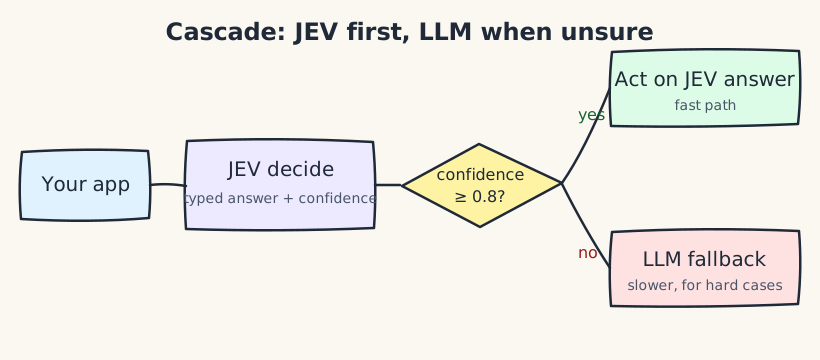
A common pattern is a cascade. JEV answers first. If its confidence is below a threshold (for example, 0.8), the request goes to a larger LLM. You choose the threshold based on how costly a wrong answer is.
Real-time use cases
- Support ticket routing. Route each incoming message to billing, technical or sales as it arrives, before a person reads it.
- Live moderation. Score each chat message for policy violations and hold the uncertain ones for review.
- Fraud and abuse signals. Ask yes/no questions such as "does this look like a phishing attempt?" on each login or message.
- Intent detection in apps. Decide what a user wants from a search box or voice transcript, then pick the next screen.
- Prompt guardrails. Check each user input for jailbreak attempts before it reaches an LLM. The TypeSafe article names this use case.
- Quality gates for LLM output. Score a generated answer for factual support or policy compliance before it is shown to a user.
- Game and agent decisions. TypeSafe's launch material includes demos of a bot that plays Doom and a Wikiracing game, showing decisions made in tight loops.
How JEV differs from an LLM
| Aspect | LLM | JEV | | --------------- | -------------------------------------- | ------------------------------------------------------ | | Output | Open-ended text | Predefined decisions with probabilities | | Typical latency | Seconds | Hundreds of milliseconds (vendor figure) | | Billing | Input and output tokens | Input tokens (per the sources) | | Explanations | Yes | No rationale returned | | Calibration | Not designed for it | Trained for calibrated probabilities (RLCD) | | Strengths | Writing, reasoning, code, conversation | Classification, routing, scoring, yes/no checks | | Failure mode | Confident-sounding wrong text | Wrong option with a confidence value you can threshold |
The two are complements, not substitutes. A common architecture puts JEV in front as a fast decision layer and calls an LLM only for cases that need language generation or deeper reasoning.
Installing the JEV API
Requirements: Python 3.10 or later.
1. Get API access. Direct API access is in early access. Request a key from the TypeSafe console. Third-party guides report a waitlist, so access may take time. Some gateways also serve JEV without one, but they use different keys and base URLs, so check their docs before using them.
2. Create a virtual environment and install the SDK.
python3 -m venv .venv
source .venv/bin/activate
pip install typesafe-sdk
Or with uv:
uv init --bare
uv add typesafe-sdk
A fresh install of typesafe-sdk version 0.7.5 on Python 3.13 imports cleanly.
3. Store your key in an environment variable. The SDK reads TYPESAFE_API_KEY automatically. Do not put the key in your code or commit it to version control.
export TYPESAFE_API_KEY="your-api-key"
On Windows, use WSL or the equivalent set or setx command.
4. Confirm the install. If the key is missing, the SDK raises a clear error before it sends anything:
from typesafe_sdk import TypeSafeClient

with TypeSafeClient(model="jev-latest") as client:
    print("Client ready")
Without TYPESAFE_API_KEY set, this raises TypeSafeError: No API key was provided.
5. Make a first decision with the SDK. The SDK handles authentication and response parsing:
from typesafe_sdk import Noul, TypeSafeClient

ticket = "Our API integration started returning 500 errors on every request about 20 minutes ago."

with TypeSafeClient(model="jev-latest") as client:
    response = client.system_one(
        state=ticket,
        questions={
            "is_urgent": Noul(instructions="The message conveys urgency or time-sensitivity"),
        },
    )

print(response.nouls["is_urgent"].noul)  # a probability from 0 to 1
The SDK exposes results by question ID: response.choices[...] for Choice questions, response.scores[...] for Score, and response.nouls[...] for Noul.
The SDK is the recommended route. The sections below use requests to show the raw HTTP request, which helps when debugging or working in a language without an SDK.
Making a raw decision request
import os

import requests

JEV_URL = "https://api.typesafe.ai/v1/systemone"


def decide(state, questions, model="jev-latest", timeout=10):
    """Send one decision request and return the parsed JSON response."""
    headers = {
        "Authorization": f"Bearer {os.environ['TYPESAFE_API_KEY']}",
        "Content-Type": "application/json",
    }
    payload = {"model": model, "state": state, "questions": questions}
    response = requests.post(JEV_URL, headers=headers, json=payload, timeout=timeout)
    response.raise_for_status()
    return response.json()
The timeout matters. A real-time system should fail fast and fall back, not hang.
Defining questions
TICKET_QUESTIONS = {
    "department": {
        "type": "choice",
        "instructions": "Which team should handle this request?",
        "criteria": {
            "billing": "Payments, invoices, refunds, or payouts",
            "technical": "Bugs, outages, or integration failures",
            "sales": "Pricing, upgrades, or new accounts",
        },
    },
    "needs_human": {
        "type": "noul",
        "instructions": "Does this request require human review?",
    },
}

result = decide(
    state={"message": "My payout has failed three times.", "days_waiting": 3},
    questions=TICKET_QUESTIONS,
)
Keep the criteria specific. Each option's description tells the model when to pick it, so clear descriptions usually beat clever prompts.
Reading the answers
The Hugging Face guide describes an answers object keyed by question name. A choice answer carries the chosen option, per-option probabilities and a confidence. A noul answer carries a single probability.
answers = result["answers"]

department = answers["department"]["choice"]
department_confidence = answers["department"]["confidence"]
human_probability = answers["needs_human"]["noul"]
Routing on confidence
Automate only when the model is sure. Send the rest to a person. For how human oversight is organized, see Human in the loop vs human on the loop.
CONFIDENCE_THRESHOLD = 0.8


def route_ticket(answers):
    if answers["department"]["confidence"] < CONFIDENCE_THRESHOLD:
        return "human_review"
    if answers["needs_human"]["noul"] >= CONFIDENCE_THRESHOLD:
        return "human_review"
    return answers["department"]["choice"]


fake_answers = {
    "department": {"choice": "billing", "confidence": 0.94},
    "needs_human": {"noul": 0.12},
}
print(route_ticket(fake_answers))
Output:
billing
Choose the threshold from data, not intuition. Run JEV on historical tickets with known labels, then pick the threshold that gives an acceptable error rate for the cases you automate.
A cascade: JEV first, LLM when unsure
def classify_with_fallback(ticket_text, llm_classify):
    """Try JEV first. Escalate to a slower LLM when confidence is low."""
    data = decide(
        {"message": ticket_text},
        {"department": TICKET_QUESTIONS["department"]},
    )
    department = data["answers"]["department"]
    if department["confidence"] >= CONFIDENCE_THRESHOLD:
        return department["choice"], "jev"
    return llm_classify(ticket_text), "llm"
llm_classify is any function that calls your LLM. The cascade keeps most traffic on the fast path and spends LLM tokens only where JEV is unsure.
Splitting one hard question into several easy ones
The TypeSafe and third-party tests suggest that breaking a question into narrower sub-questions and combining the answers can raise accuracy. Here is a simple combination rule:
PHISHING_CHECKS = {
    "asks_for_credentials": {
        "type": "noul",
        "instructions": "Does the message ask the reader to enter a password or login details?",
    },
    "urgent_deadline": {
        "type": "noul",
        "instructions": "Does the message claim an urgent deadline or threat?",
    },
    "unknown_sender": {
        "type": "noul",
        "instructions": "Does the message come from a sender the content does not identify clearly?",
    },
    "suspicious_link": {
        "type": "noul",
        "instructions": "Does the message contain a link that does not match the claimed sender?",
    },
    "payment_request": {
        "type": "noul",
        "instructions": "Does the message ask for money, gift cards or a payment change?",
    },
}


def phishing_score(message):
    data = decide({"message": message}, PHISHING_CHECKS)
    probs = [data["answers"][key]["noul"] for key in PHISHING_CHECKS]
    # Average the yes-probabilities. Each check is one simple, testable question.
    return sum(probs) / len(probs)
Averaging is only one option. Test other combination rules, such as the maximum or a weighted sum, on labeled examples, and keep whichever works best on your data.
Testing without an API key
You can test routing logic offline with a canned response shaped like the real one. This keeps unit tests fast and free:
def test_low_confidence_goes_to_human():
    fake_answers = {
        "department": {"choice": "sales", "confidence": 0.51},
        "needs_human": {"noul": 0.20},
    }
    assert route_ticket(fake_answers) == "human_review"


def test_confident_billing_is_automated():
    fake_answers = {
        "department": {"choice": "billing", "confidence": 0.94},
        "needs_human": {"noul": 0.12},
    }
    assert route_ticket(fake_answers) == "billing"
Run these with pytest. Add a small set of recorded real responses so the parser keeps matching the live API.
Limitations and risks
- No rationale. You get a decision and a probability, not an explanation. For regulated decisions, keep a separate audit log or generate a justification with an LLM.
- Calibration must be verified. A stated confidence is only useful if it matches reality on your data. Measure it.
- Thresholds shift the risk. Critics argue JEV moves the hallucination problem onto the developer, who has to choose safe thresholds.
- Negation and implied conditions. Sources report that JEV can misread them. Test inputs such as "this is not a refund request."
- Long context hurts accuracy. Send only the evidence each question needs.
- Adversarial inputs. Users can write text to steer a decision. Do not let JEV trigger sensitive actions on its own. Put permission checks or human approval in front of them.
- Language coverage. The sources give no public benchmarks for most non-English languages. Test on the languages you serve.
- Vendor claims. Speed, cost and benchmark figures come mostly from TypeSafe. The sources note that tests were run from one location and may be biased, and that pricing may be subsidized.
- Pricing and endpoints change. The sources disagree on both, so check the official docs.
Summary
JEV AI is a decision model, not a chatbot. It takes state and a set of questions, and returns typed answers with calibrated confidence in a few hundred milliseconds. Use it for classification, routing, scoring and yes/no checks in high-volume or real-time paths. Keep LLMs for generation and explanation. Put a confidence threshold between the two, and measure both accuracy and calibration on your own data before relying on either.
Sources
- jevai.net: product overview (a community resource, not affiliated with TypeSafe AI)
- TypeSafe AI, "Introducing System One Models and Jev"
- GreenNode, "What is JEV"
- Hugging Face blog, "How to use the Jev AI model: a step-by-step developer guide"
- TypeSafe AI docs, quickstart: https://docs.typesafe.ai/introduction/quickstart.md
- PyPI,
typesafe-sdk: https://pypi.org/project/typesafe-sdk/